How to View Reward Points Activity on American Express
American Express reward points offer great value for cardholders who enjoy travel, shopping, dining, and other perks. Many people collect points through everyday spending but often forget to track how those points move in and out of their accounts. Keeping an eye on reward points activity helps you understand your earnings, identify redeemed points, and spot any unexpected changes.
American Express provides several ways to review your reward points history through its website and mobile app. Whether you want to check recent earnings, confirm a redemption, or monitor your balance, the process remains simple and quick. This guide explains how to view reward points activity on American Express and provides useful tips to manage your rewards account effectively.
How to View Reward Points Activity on American Express
Checking your reward points activity allows you to stay informed about your account and maximize the value of your rewards. Follow these methods to access your points history.
Log In to Your American Express Online Account
The easiest way to view reward points activity starts with your online account.
Steps:
- Visit the American Express website.
- Sign in using your User ID and password.
- Select the credit card linked to your rewards account.
- Click the “Rewards” or “Membership Rewards” section.
- Open your rewards dashboard.
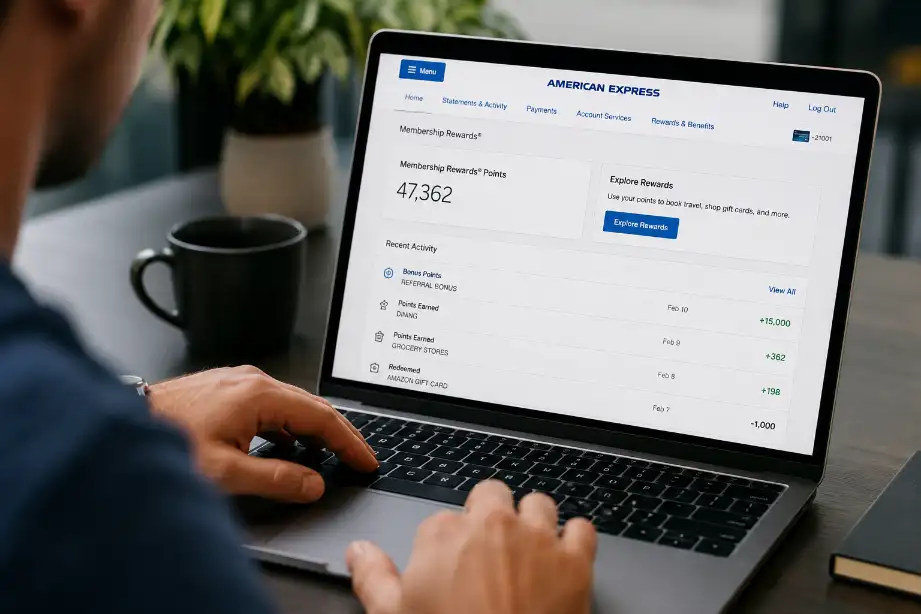
The dashboard displays your current points balance and recent reward activity.
Check Membership Rewards Activity
After entering the rewards section, you can view detailed transactions related to your points.
You may see:
- Points earned from purchases
- Bonus points promotions
- Redeemed points
- Adjustments or corrections
- Expired points, if applicable
The activity page often includes transaction dates and point amounts, making it easy to track changes.
Review Your Monthly Statements
American Express statements also provide reward points information.
To access statements:
- Log in to your account.
- Navigate to the Statements section.
- Select the desired billing period.
- Open the statement PDF.
Many statements show:
- Beginning rewards balance
- Points earned during the cycle
- Points redeemed
- Ending rewards balance
This method helps compare monthly activity over time.
Use the American Express Mobile App
The mobile app offers a convenient way to monitor rewards while traveling or shopping.
Steps:
- Open the American Express app.
- Sign in securely.
- Tap your eligible card account.
- Select Rewards or Membership Rewards.
- Review recent points activity.
The app displays current balances and recent transactions in a user-friendly format.
Check Redemption History
Many cardholders want to confirm whether a redemption request processed successfully.
Within the rewards section, locate the redemption history area.
You can review:
- Travel bookings
- Gift card purchases
- Statement credits
- Shopping redemptions
- Transfer transactions to loyalty programs
This section confirms the number of points used and the date of redemption.
Understanding Different Types of Reward Points Activity
American Express rewards accounts include several activity categories. Understanding these categories helps you manage your points better.
Points Earned From Purchases
Every eligible purchase may generate points according to your card’s rewards structure.
Examples include:
- Grocery purchases
- Restaurant spending
- Online shopping
- Travel expenses
- Gas station purchases
Different categories may earn different point rates.
Bonus Reward Points
American Express often offers promotions that award extra points.
Bonus points may come from:
- Welcome offers
- Spending milestones
- Limited-time promotions
- Referral programs
- Partner offers
Reviewing your activity helps confirm that bonus points posted correctly.
Points Redemptions
Redemptions reduce your available balance.
Common redemption options include:
- Travel bookings
- Gift cards
- Merchandise
- Statement credits
- Airline and hotel transfers
Monitoring redemption activity prevents confusion about balance changes.
Point Adjustments
Occasionally, American Express may adjust reward points.
Adjustments can result from:
- Returned purchases
- Disputed transactions
- Account corrections
- Promotional revisions
Checking activity regularly helps you identify these changes quickly.
Tips for Managing Your American Express Reward Points
Tracking points activity becomes more useful when paired with smart account management.
Check Your Rewards Account Regularly
Frequent reviews help you:
- Verify earned points
- Confirm successful redemptions
- Identify unusual activity
- Monitor promotional bonuses
Monthly reviews work well for most cardholders.
Save Confirmation Emails
American Express sends emails for many reward transactions.
Keep these messages for:
- Travel bookings
- Gift card orders
- Points transfers
- Redemption confirmations
They provide a helpful reference if questions arise later.
Compare Activity With Spending Records
Compare rewards activity with your card purchases.
This practice helps you:
- Verify point earnings
- Confirm promotional rewards
- Detect missing transactions
- Maintain accurate records
Watch for Expiration Rules
Some rewards programs impose expiration policies under certain conditions.
Review program terms and activity records to avoid losing points unexpectedly.
Common Issues When Viewing Reward Points Activity
Most users access rewards information without problems. Still, a few situations may occur.
Points Do Not Appear Immediately
Points often require processing time before posting to your account.
Possible reasons include:
- Recent purchases
- Pending transactions
- Promotional processing periods
- Merchant delays
Waiting a few days often resolves the issue.
Missing Bonus Points
If expected bonus points do not appear:
- Review promotion requirements.
- Check eligibility terms.
- Verify spending thresholds.
- Contact customer service if needed.
Redemption Not Showing
Some redemptions require additional processing time.
Review:
- Confirmation emails
- Rewards history
- Pending transactions
Contact support if delays continue beyond the expected timeframe.
Benefits of Monitoring Reward Points Activity
Regular tracking provides several advantages.
Better Rewards Planning
Knowing your balance helps you plan future redemptions more effectively.
Faster Problem Detection
Quick reviews help identify errors before they become larger issues.
Improved Financial Organization
Monitoring rewards alongside spending creates a clearer picture of your account activity.
Maximum Rewards Value
Active management helps you use points wisely and avoid overlooking available benefits.
Conclusion
Viewing reward points activity on American Express helps you stay informed about your rewards balance and account performance. Whether you use the website, mobile app, or monthly statements, American Express provides several simple ways to review your points history.
Regular monitoring allows you to confirm earned rewards, track redemptions, and identify any unexpected changes. A few minutes each month can help you maintain accurate records and make smarter redemption decisions.
By understanding how points enter and leave your account, you can enjoy the full value of your American Express rewards program and make every eligible purchase count toward future benefits.
F.A.Q
How can I check my American Express reward points balance?
Log in to your American Express account and open the Rewards section.
Can I view reward points activity through the mobile app?
Yes, the American Express app allows you to view balances and recent rewards activity.
How long does it take for reward points to appear?
Most points appear after eligible transactions complete processing.
Can I see my redemption history online?
Yes, the rewards dashboard includes a redemption history section.
Why are some reward points missing?
Returned purchases, pending transactions, or promotion requirements may affect point posting.
Do American Express statements show reward points activity?
Many statements include points earned, redeemed, and current balances.
What should I do if my points activity looks incorrect?
Review your transactions and contact American Express customer support for assistance.