How to Enable Two-Factor Authentication on American Express Accounts
Online security matters more than ever as cyber threats continue to target personal and financial accounts. Credit card accounts contain sensitive information, including payment details, personal data, and transaction history. A single security breach can create serious problems for cardholders. American Express offers several security tools that help protect customer accounts from unauthorized access.
One of the most effective options is two-factor authentication (2FA). This extra security layer requires users to verify their identity before accessing account information. By enabling two-factor authentication on your American Express account, you can reduce security risks and gain greater control over your financial information. This guide explains how to enable 2FA, why it matters, and how to use it effectively.
How to Enable Two-Factor Authentication on American Express Accounts
Setting up two-factor authentication on your American Express account takes only a few minutes. Follow these steps to secure your account.
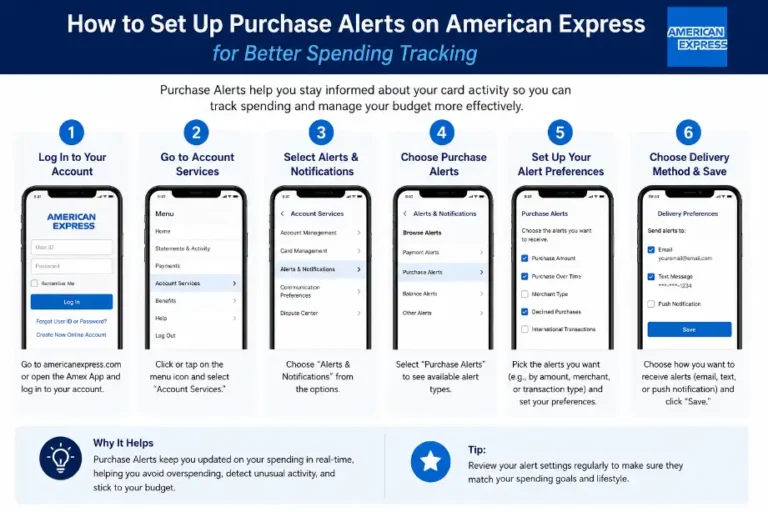
Step 1: Sign In to Your American Express Account
Visit the official American Express website or open the American Express mobile app. Enter your username and password to access your account dashboard.
Step 2: Open Account Security Settings
After logging in, locate the account settings section. Look for options related to:
- Security Settings
- Login Preferences
- Account Protection
- Privacy and Security
Select the security-related menu to continue.
Step 3: Verify Your Contact Information
American Express may require updated contact details before activating two-factor authentication. Check that your:
- Mobile phone number is correct
- Email address is active
- Recovery information remains current
Update any outdated information before moving forward.
Step 4: Choose a Verification Method
American Express may provide one or more verification options such as:
- Text message verification
- Email verification
- Security code through the mobile app
Select the option that works best for you.
Step 5: Complete Identity Verification
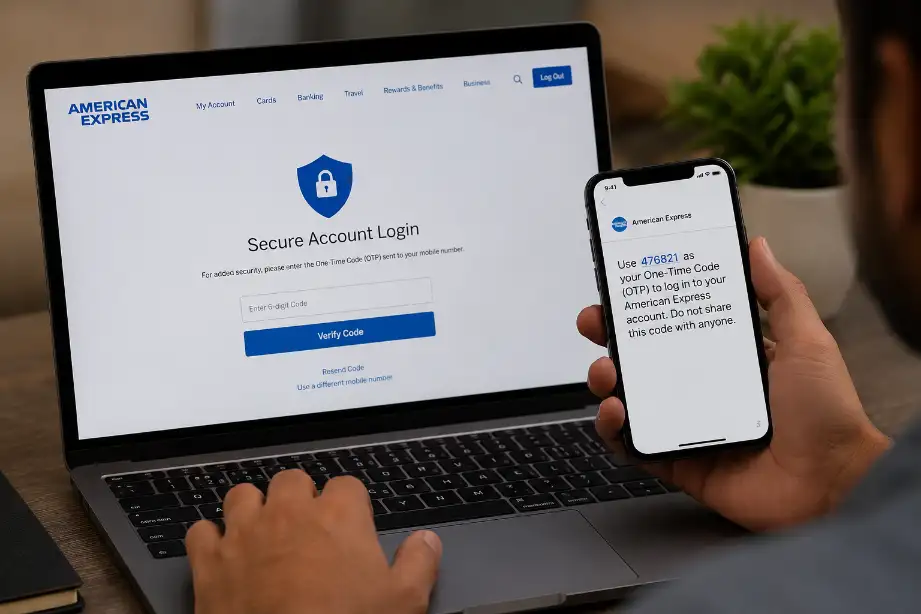
American Express sends a verification code to your selected method. Enter the code in the provided field to confirm your identity.
Step 6: Activate Two-Factor Authentication
After verification, save your settings. Your account now requires an additional verification step during future login attempts.
Step 7: Test the Security Feature
Sign out of your account and sign in again. Confirm that American Express requests a verification code along with your password.
Why Two-Factor Authentication Matters
Passwords alone no longer provide enough protection. Cybercriminals use phishing attacks, data breaches, and malware to steal login credentials.
Two-factor authentication adds another barrier by requiring:
- Something you know (your password)
- Something you have (your phone or email access)
Even if someone obtains your password, they still need the second verification method to access your account.
Key Security Benefits
- Reduces unauthorized account access
- Protects financial information
- Adds extra login security
- Alerts you to suspicious login attempts
- Strengthens account protection during travel
Common Verification Methods Used by American Express
American Express may use different authentication methods depending on your location and account type.
SMS Verification Codes
This method sends a one-time code to your registered mobile phone.
Benefits include:
- Easy setup
- Fast delivery
- Simple verification process
Email Verification
A temporary security code arrives in your registered email inbox.
Advantages include:
- Convenient access
- No additional apps required
- Useful as a backup option
Mobile App Authentication
The American Express mobile app may provide verification prompts or security codes.
Benefits include:
- Faster approvals
- Improved security
- Easy account management
Tips for Keeping Your American Express Account Secure
Two-factor authentication works best when combined with other security habits.
Create a Strong Password
Use a password that contains:
- Uppercase letters
- Lowercase letters
- Numbers
- Special characters
Avoid personal information such as birthdays or names.
Never Share Verification Codes
American Express representatives will never ask for your one-time security code. Anyone requesting it likely intends to access your account.
Update Contact Information Regularly
Outdated phone numbers and email addresses can prevent successful account verification.
Review your contact details every few months.
Monitor Account Activity
Check your account frequently for:
- Unknown purchases
- Failed login attempts
- Suspicious account changes
Early detection helps prevent larger issues.
Enable Account Alerts
American Express offers alerts for:
- Purchases
- Payments
- Login activity
- Account updates
These notifications help you spot unusual activity quickly.
Troubleshooting Two-Factor Authentication Issues
Sometimes users encounter problems during setup or login.
Not Receiving Verification Codes
Try these solutions:
- Check mobile signal strength.
- Verify your phone number.
- Review spam or junk email folders.
- Request a new code.
- Restart your device.
Lost Access to Your Phone
Contact American Express customer support immediately.
You may need to:
- Verify your identity
- Update your phone number
- Reset authentication settings
Verification Code Expired
Security codes often expire after a short period.
If the code expires:
- Request another code
- Enter it immediately
- Avoid opening multiple code requests simultaneously
Additional Security Features Offered by American Express
Two-factor authentication forms only one part of account security.
Fraud Monitoring
American Express continuously monitors transactions for unusual activity and may notify cardholders about suspicious purchases.
Secure Login Technology
Advanced login systems help identify unusual access attempts and suspicious devices.
Account Notifications
Real-time alerts keep you informed about:
- Purchases
- Payments
- Login attempts
- Security updates
Card Freeze Options
Many cardholders can temporarily freeze their cards if they suspect unauthorized activity.
Mistakes to Avoid When Using Two-Factor Authentication
Many users weaken security by making simple mistakes.
Avoid the following:
- Reusing passwords across multiple websites
- Ignoring security alerts
- Sharing authentication codes
- Using outdated contact information
- Disabling security features for convenience
- Logging in through public computers without caution
Strong security habits work together to protect your financial accounts.
Conclusion
Two-factor authentication provides one of the simplest ways to improve the security of your American Express account. A password alone may not stop unauthorized access, but a second verification step adds an extra layer of protection. The setup process takes only a few minutes and can help protect sensitive financial information from cyber threats.
By enabling two-factor authentication, maintaining strong passwords, monitoring account activity, and keeping contact information updated, you create a safer online banking experience. Small security measures often prevent major problems, making two-factor authentication a smart choice for every American Express cardholder.
Frequently Asked Questions
Does American Express offer two-factor authentication?
Yes, American Express provides additional verification methods to help secure customer accounts.
Is two-factor authentication free on American Express accounts?
Yes, American Express offers this security feature at no extra cost.
Can I use my email for verification?
Yes, some accounts may support email verification options.
What should I do if I lose my phone?
Contact American Express support and update your authentication settings.
Will I need a verification code every time I log in?
American Express may request codes depending on device recognition and security settings.
Can hackers bypass two-factor authentication?
2FA greatly reduces risk, though users should still follow good security practices.
How long does setup take?
Most users complete the setup process within a few minutes.